If you use Better Auth with OAuth providers like Google in production, you might encounter this error in your logs:
ERROR [Better Auth]: Failed to parse state BetterAuthError: State mismatch: State not persisted correctly
GET /api/auth/error?error=state_mismatch
Everything works fine on localhost, but authentication fails in production. In this post, I will explain why this error happens and how to fix it cleanly using Cloudflare without adding extra code to your server.
Why Does This Error Happen?
Better Auth needs a single base URL to process security tokens and state cookies correctly.
When a user logs in, OAuth follows these steps:
- Start Request: The user clicks “Sign in with Google” on https://www.saifulalom.com. Your server sets a security cookie on the www.saifulalom.com domain.
- Provider Authorization: Google processes the login and sends the user back to your callback URL on https://saifulalom.com (without
www). - State Check: Better Auth checks the browser cookies on https://saifulalom.com to verify the login state.
Because web browsers do not share security cookies across different subdomains (www vs non-www), the security cookie is missing when Google redirects back. Better Auth stops the request to protect your site and throws a State mismatch error.
The Solution: Single Source of Truth via Cloudflare
Instead of writing custom redirect middleware in your application code, you can enforce a single base URL at the edge using Cloudflare DNS and Redirect Rules.
This approach stops invalid domain requests before they reach your Cloudflare Worker or server.
Step 1: Configure Cloudflare CNAME Record
Make sure your www subdomain points to your main domain with proxying enabled:
- Type:
CNAME - Name:
www - Target:
saifulalom.com - Proxy Status: Proxied (Orange Cloud ON)
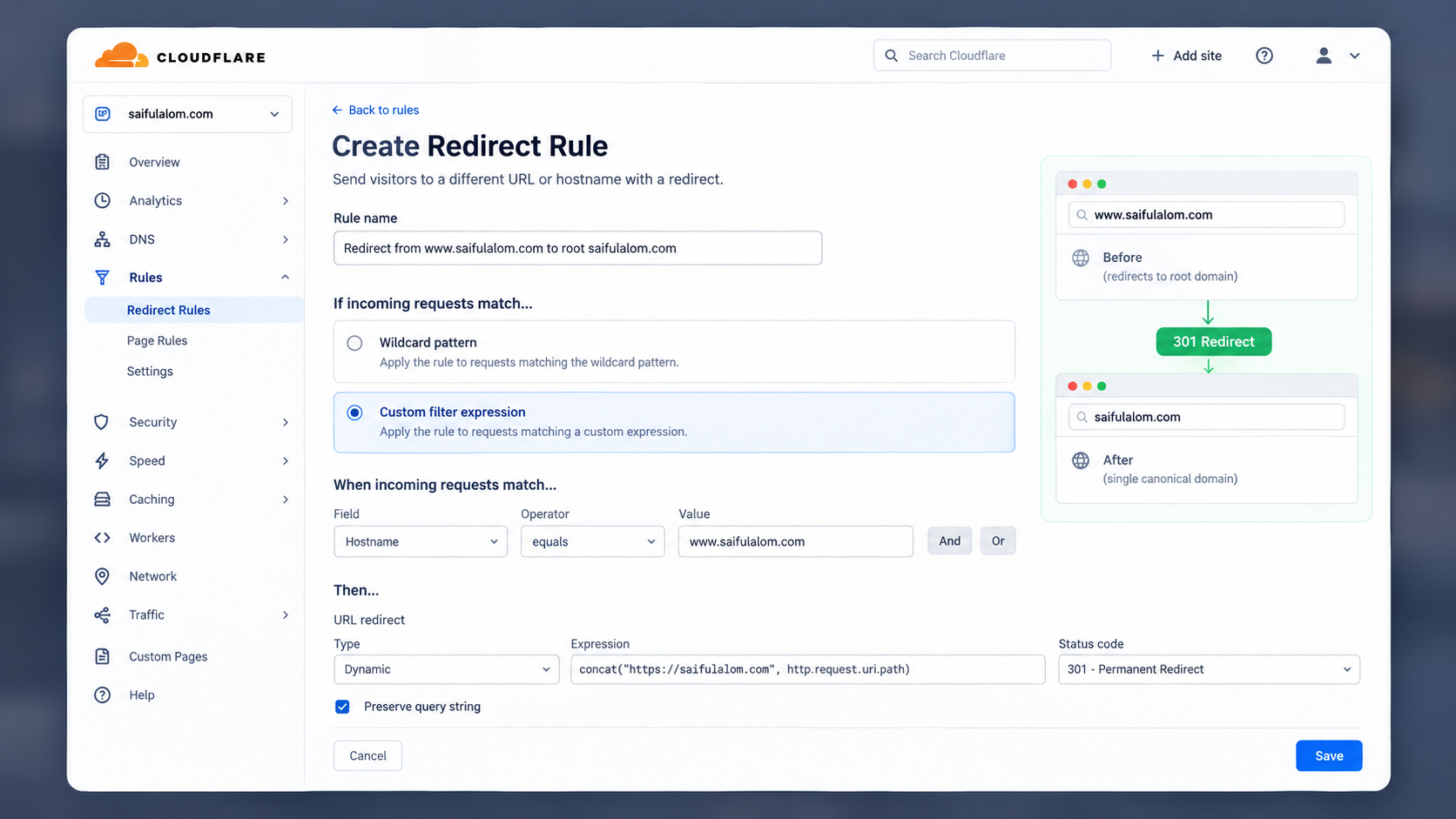
Step 2: Create a Cloudflare Single Redirect Rule
- Open your Cloudflare Dashboard and select your domain.
- Go to Rules > Redirect Rules > Create Rule.
- Configure the rule options carefully:
-
Rule Name:
Redirect from www.saifulalom.com to root saifulalom.com -
If incoming requests match…
-
Select the second option: Custom filter expression (by default, Cloudflare selects the first option, so make sure to click the second one).
-
When incoming requests match…
-
Field:
Hostname -
Operator:
equals -
Value:
www.saifulalom.com -
Then… (URL redirect)
-
Type:
Dynamic -
Expression:
concat("https://saifulalom.com", http.request.uri.path) -
Status Code:
301 - Permanent Redirect -
Preserve query string: Checked
Step 3: Update Better Auth Environment Variables
Set your production environment variable to your canonical root domain:
BETTER_AUTH_URL=https://saifulalom.comIn your server initialization code, keep your setup clean:
export const auth = betterAuth({
    trustedOrigins: [
        env.BETTER_AUTH_URL,
    ],
    baseURL: env.BETTER_AUTH_URL,
    secret: env.BETTER_AUTH_SECRET,
    // ... rest of your options
});
Conclusion
By redirecting all www traffic to your main root domain at the DNS level:
- Visitors always use a single canonical domain https://saifulalom.com.
- OAuth security cookies are always set and read on the exact same origin.
- Better Auth state verification succeeds without any
State mismatcherrors.